It's been a long time since my last post, apologies for that! Anyway, I have decided to make up for that time and give you some great stuff!
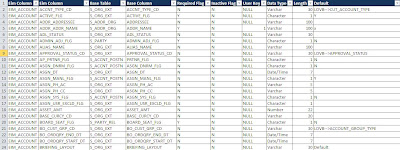
Recently, I had a LOT of people asking for a way to Automatically generate EIM Mappings. I have written a post previously called Generate EIM mapping using SQL Script. However I made some new changes that will give you more information than before.
So here are the updated versions for Oracle and MS SQL
Output Preview
Document Links : Do what the document tells you are you're good!
The below query is a modified spool generated after querying on the “Products” applet on ‘Internal Products List view’.
SELECT
T1.NAMEas Product
,T1.CFG_MODEL_ID
,T2.ROW_ID as'S_VOD ROW_ID'
,T2.OBJECT_NUM
,T3.VOD_ID as'S_ISS_OBJ_DEF VOD_ID'
,T3.PAR_VOD_ID as'S_ISS_OBJ_DEF PAR_VOD_ID'
,T13.VOD_ID as'S_VOD_VER VOD_ID'
,T13.RELEASED_FLG
FROM
dbo.S_PROD_INT T1
LEFTOUTERJOIN dbo.S_VOD T2 ON T1.CFG_MODEL_ID = T2.OBJECT_NUM
LEFTOUTERJOIN dbo.S_ISS_OBJ_DEF T3 ON T2.ROW_ID = T3.VOD_ID AND T3.LAST_VERS isnotnull
LEFTOUTERJOIN dbo.S_VOD T4 ON T3.PAR_VOD_ID = T4.OBJECT_NUM AND T4.VOD_TYPE_CD ='ISS_CLASS_DEF'
LEFTOUTERJOIN dbo.S_VOD_VER T13 ON T2.ROW_ID = T13.VOD_ID AND T13.RELEASED_FLG ='Y'
Result
·As you ca see in the above picture the Product ‘RG Product’ has RELEASED_FLG as NULL, this Product was created from the UI “Administration – Products” screen.
·Any Product created from the screen has to be released by that owner of the product, this can be done by clicking the “Release” button on the “Administration – Products” screen.(Usually Products information is added only by company administrators)
·Currently I am logged in as ‘SADMIN’ .You can see that the Release button is not active.
·When logged in with ‘GRYAN’ only then will the Release button be enabled.(as below)
·Once the Lock has been released an association is created on the S_VOD_VER table and the RELEASE_FLG is updated to ‘Y’.
Queries to check associations on the Siebel Data base:
1)Query to get all Products that are associated/ not associated to the S_VOD table.
select T1.NAME, T1.CFG_MODEL_ID, T2.OBJECT_NUM from S_PROD_INT T1
LEFTOUTERJOIN dbo.S_VOD T2 ON T1.CFG_MODEL_ID = T2.OBJECT_NUM
Result
For records that are not associated to the S_VOD table will have CFG_MODEL_ID and OBJECT_NUM as NULL
1)Query to get only those Products that are associated to the S_VOD table.
select T1.NAME, T1.CFG_MODEL_ID, T2.OBJECT_NUM from S_PROD_INT T1
LEFTOUTERJOIN dbo.S_VOD T2 ON T1.CFG_MODEL_ID = T2.OBJECT_NUM
where OBJECT_NUM isnotnull
After Importing Products using EIM:
·After Products are successfully imported using EIM the next step is to execute the Business Service