Hey Everybody,
Hope you all are doing Great!
It's been a long time since my last post, apologies for that! Anyway, I have decided to make up for that time and give you some great stuff!
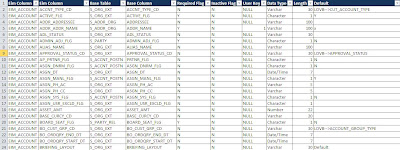
Recently, I had a LOT of people asking for a way to Automatically generate EIM Mappings. I have written a post previously called Generate EIM mapping using SQL Script. However I made some new changes that will give you more information than before.
So here are the updated versions for Oracle and MS SQL
Output Preview
Document Links : Do what the document tells you are you're good!
Automate Siebel EIM Mapping using SQL_MSSQL
Automate Siebel EIM Mapping using SQL_Oracle
Watch out for more interesting Stuff!
Cheers!
Ryan
Hope you all are doing Great!
It's been a long time since my last post, apologies for that! Anyway, I have decided to make up for that time and give you some great stuff!
Recently, I had a LOT of people asking for a way to Automatically generate EIM Mappings. I have written a post previously called Generate EIM mapping using SQL Script. However I made some new changes that will give you more information than before.
So here are the updated versions for Oracle and MS SQL
Output Preview

Document Links : Do what the document tells you are you're good!
Automate Siebel EIM Mapping using SQL_MSSQL
Automate Siebel EIM Mapping using SQL_Oracle
Watch out for more interesting Stuff!
Cheers!
Ryan