Monday, May 24, 2010

Generate pdf report with Images in CRM On Demand

Hi,

I had a requirement where the client had to display their company Image on pdf when the report was downloaded, the Image I was referencing was on their Company Portal. unfortunately the pdf file wouldn't pick this image, it worked only for HTML downloads.


Here is how you do it!

You can get Images from websites into your pdf file, but this will include two extra clicks...

Go to any report, click the “Printer Friendly” option, and select HTML.


An HTML webpage will be generated for that report, now in that web page in the Menu bar, go to File and select Print…


The below popup screen will be displayed, select “Adobe PDF” and click Print.


After you click Print you will have to save the Report, the save as type is automatically set to PDF, enter the Name . 


And your pdf is generated will the Company logo.

Cheers!

Friday, May 14, 2010

Repository Script Extractor for Siebel versions > 7.7

Hey folks,

Want to have a backup of all those cool and interesting scripts you wrote, but find it too taxing to manually copy each and every script in to a good readable format?

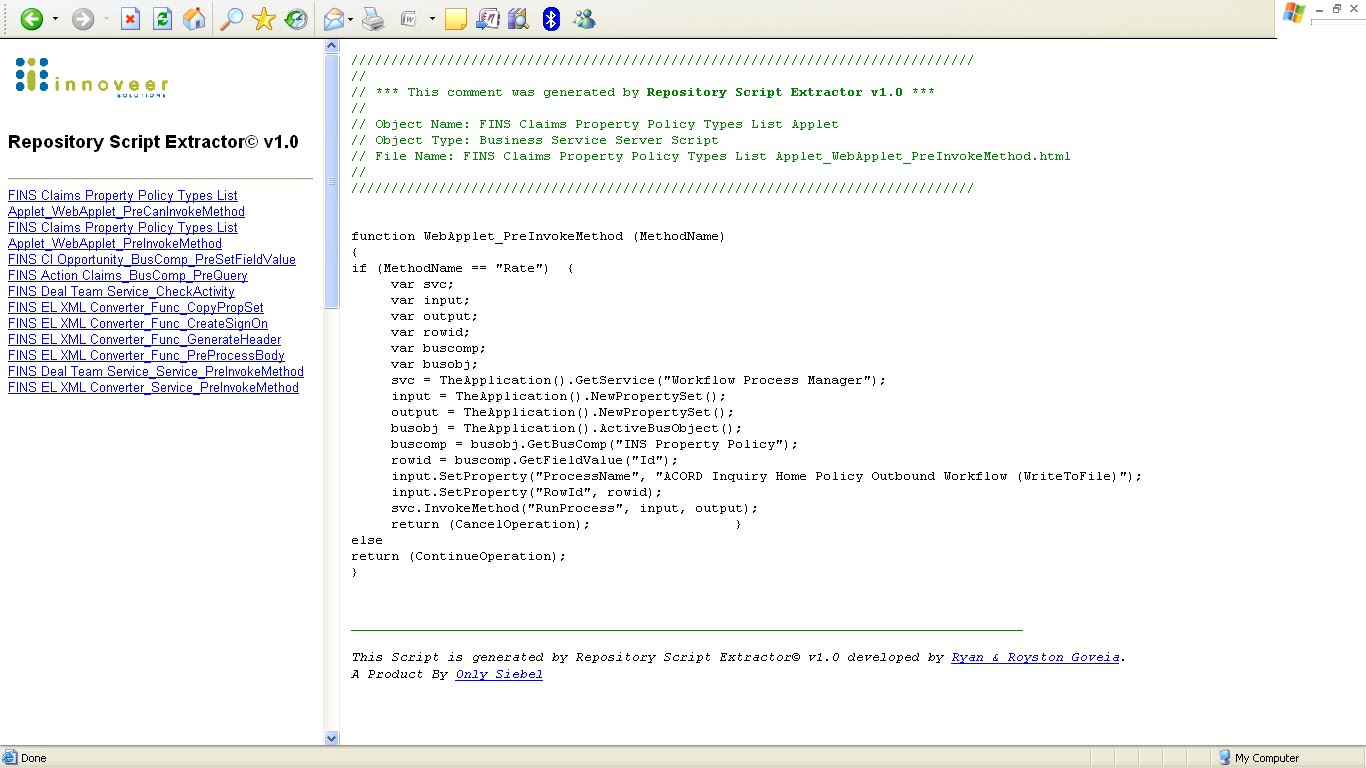
Here is a new tool the we have been working on. What it basically does is, it extracts the scripts based on a user given date or a prefix. Any scripts that were created or updated beyond the date will be exported into the excel sheet as well as in an HTML format just like the utility Oracle had introduced to extract scripts for versions 7.7 and earlier.

The tool connects to Siebel via the object layer and pulls out the information...

Here is a peak at what this tool looks like

Main UI


HTML Output


Click the below icon to download this cool tool..!


Cheers!

Sunday, April 11, 2010

Siebel CRM Market Statistics

Hey Folks,

A few graphs I'd like to share about Siebel CRM and its demand in the market.

                        Siebel World Wide Demand


                      Siebel – Favourite Cities


                        Siebel Salary Comparison


                       Siebel – Skills based demand trend


So for those of you who are not so sure on which area in siebel to pick up, this could give you a heads up...

Some More Graphs


Cheers!

Wednesday, March 24, 2010

Oracle CRM On Demand and Google Talk

Hey Guys,
If you are a Google Talk user, you may be aware that there is a link that allows you to sign into your Google account and chat with your contacts without the GTalk setup installation.

We are about to use this cool feature in Oracle CRM On Demand to help Service Reps to chat with customers to resolve their queries.

This feature may also be available for other messengers (yahoo, rediffmail, windows live), but let’s talk about Google for now.
  
Step 1:  
Navigate to Admin---Application Customization---Global Web Applets. 
Create a New Web applet and Fill in the below. You may also choose to have this on the Homepage according to your requirement.


Step 2:  Add the Custom Web Applet to your Action bar for the ‘My Setup---Personal Layout---Action Bar Layout’ Global link.


You should now see the Custom Web applet on your Action Bar.
Finally, Sign in to your Google Account by clicking the sign in link and enjoy!  Cheers! 
 

Wednesday, March 3, 2010

Repository Data Retriever© v1.0

Hey Folks,

Here is an excel spreadsheet I had been working for the past couple weeks. It has been designed to export all the newly created and modified objects beyond a particular user given date.

Special features include -
- Works on Sample/ Local and Server.
- Cool UI features to minimize user effort (Object Explorer, date Chooser, Select File Dialogbox)
- Process Status section. This is so the user is not prompted everytime unless a critical error has occured or user intervention is really required.
- Data is exported in an easily readable format
- Can be very well used for Upgrades to analyze the amount of Repository Customization

Interface Detail:


Screen prints of the tool -

Main Page -


Exported Objects View -


Click on the below icon to download the Repository Data Retriever (limited downloads).


Cheers!

Friday, February 26, 2010

Narrative View in Oracle On Demand


Here is a post about Narrative View's in Oracle On Demand. Thanks to my good friend and colleague Asmita for sharing this.
  
Narrative view allows report users to display multiple reports or virtually any HTML content.

Narrative view is used to create letters, quotes, or invoices.
Using Narrative view we can embed other reports, web pages, or any HTML document.

Step 1: Select the appropriate Subject Area and add the columns/data you want to display in the report


Step 2: Code a HTML file as per required format. To embed report columns in to HTML add ‘@’ followed by column number.  
E.g. @1 – Society Name


Note: Count Columns from left to right.

Step 3: Add a Narrative view to your report by clicking the Add View button, moving to the advanced submenu, and selecting the Narrative option.


Step 4:  
-The Edit View: Narrative window contains five fields


- Add HTML file syntax created in Step 2 in Narrative field


- Save and Run


Useful tips:


·         Alignment sometimes gets confused, set it at the narrative format level to left.
·         Sometime you need to edit the HTML, for sizing, row breaks.
·         Keep it simple to start with.
·         Use tables for layout where you can.
·         You can insert images but they must be accessible to all users.
·         Use the narrative object to integrate external websites for information.
·         Add a web link to launch the report specifically for a contact/account etc. e.g. the change of address.
·         Narrative reports need the scripting privilege on your role to access.

Cheers!

Share/Bookmark