Sunday, September 19, 2010

Launching iHelp with eScript

Hey Folks,

I had a requirement with one of my clients to have a button on a Form Applet that opens the iHelp.

"My Oracle Support" has a few SR's that are related, and I had tried various things including trapping the method calls that are triggered when clicking on the iHelp button on the Toolbar, then repeating them on my custom button but with no luck.

Oracle support seems to confirm you can't Launch iHelp with Script in Siebel 7.7, but doesn't mention Siebel 8.1 (which probably means you can't do it!)

This however is possible through script. You could use the below code on the button to toggle the iHelp from a custom button.

Code:

function WebApplet_PreInvokeMethod (MethodName)
{
    if(MethodName == "LaunchiHelp")
    {
        var
oBS= TheApplication().GetService("Task Assistant UI Service");
        var
psInputs = TheApplication().NewPropertySet();
        var
psOutputs = TheApplication().NewPropertySet();
       
oBS.InvokeMethod("ToggleiHelp", psInputs,psOutputs);
        return (CancelOperation);
    }
}

Your custom button should now function exactly like the iHelp launch button on the toolbar.

Update (thanks to my colleague for sharing this)


I have had to add an update to the code so that it looks like this:

var psInputs = TheApplication().NewPropertySet();
var psOutputs = TheApplication().NewPropertySet();
psInputs.SetProperty("Command", "#14");

var oBS = TheApplication().GetService("Task Assistant UI Service");
oBS.InvokeMethod("ToggleiHelp", psInputs, psOutputs);

Without this parameter there are issues with opening / closing iHelp multiple time from different entities. It results in a Siebel crash and you have to log in again. With the command property it appears to work fine.

Just a word of caution: this command number is likely to be different in different version of Siebel. It is 8.1.1.2 SIA [21215] ENU that I have this working for.

Cheers!

Friday, August 6, 2010

Get NASDAQ Market updates in Siebel

Like most of you Siebel lovers I too like to integrate anything and everything with Siebel. Here is an example of how you can get NASDAQ updates within your Siebel Application.

Here is how you do it!

Steps:
1. Create an applet with a Single control.
2. Add the following code to your single control that you have in your applet.

Caption String Override: (in frame src tags) ="tickerpanel.asp?COOKIE=S~MSFT~~|S~INTC~~|S~NWSA~~|S~QQQQ~~|S~CSCO~~|
S~ATML~~|S~DELL~~|S~NVDA~~|S~RIMM~~|S~MU~~|I~IXIC|I~INDU|I~SPX" name="ticker" scrolling="no" frameborder=0 noresize marginwidth="0" marginheight="0"
3. place this applet in a view and your done!


Stay tuned for a more advanced version of this post!

Cheers!

Thursday, July 8, 2010

Create an HTML email in Oracle CRM On Demand

Hey Folks,

For any business, It's very important to keep your customers happy at all times.You need to constantly keep them updated on how their service requests are being processes. Below is one such example

I recently came across a requirement in which my client wanted to have some functionality in which, when a new SR is created, a Service Representative should be able to generate a neatly formatted email with all the required information and send it across to a Customer, so they know that the SR is being looked into, something like a SR Acknowledgment.

Here's what I did for them!

Solution:

Step 1: Build the Report
Create a Narrative Report that will contain all the required fields that is required to send out an email.


In Step 2 on the reports wizard add only a Narrative View


Save the report


Step 2: Create a Weblink and add to the Layout

Create a Weblink field in the Service Request Object.
Edit the weblink properties and add it to your report, note that we are passing the SR number as a parameter in the report, so we get details specific to this record only.


Add this weblink to the Layout assigned to your user role.

Step 3: View your changes
Create  a new SR record or view an existing SR record that has all the required fields you need to successfully send out the email. You should see the email weblink that we created in Step 2 above


Click on the Weblink to launch the report. you will now see your neatly formatted email with all the required details.


Step 4: Add this in Outlook.
In your IE menu bar click File -> Send -> Page by E-mail...


The above step will create new email in Outlook with your formatted report.


And you're ready to go!

Cheers!

Monday, May 24, 2010

Generate pdf report with Images in CRM On Demand

Hi,

I had a requirement where the client had to display their company Image on pdf when the report was downloaded, the Image I was referencing was on their Company Portal. unfortunately the pdf file wouldn't pick this image, it worked only for HTML downloads.


Here is how you do it!

You can get Images from websites into your pdf file, but this will include two extra clicks...

Go to any report, click the “Printer Friendly” option, and select HTML.


An HTML webpage will be generated for that report, now in that web page in the Menu bar, go to File and select Print…


The below popup screen will be displayed, select “Adobe PDF” and click Print.


After you click Print you will have to save the Report, the save as type is automatically set to PDF, enter the Name . 


And your pdf is generated will the Company logo.

Cheers!

Friday, May 14, 2010

Repository Script Extractor for Siebel versions > 7.7

Hey folks,

Want to have a backup of all those cool and interesting scripts you wrote, but find it too taxing to manually copy each and every script in to a good readable format?

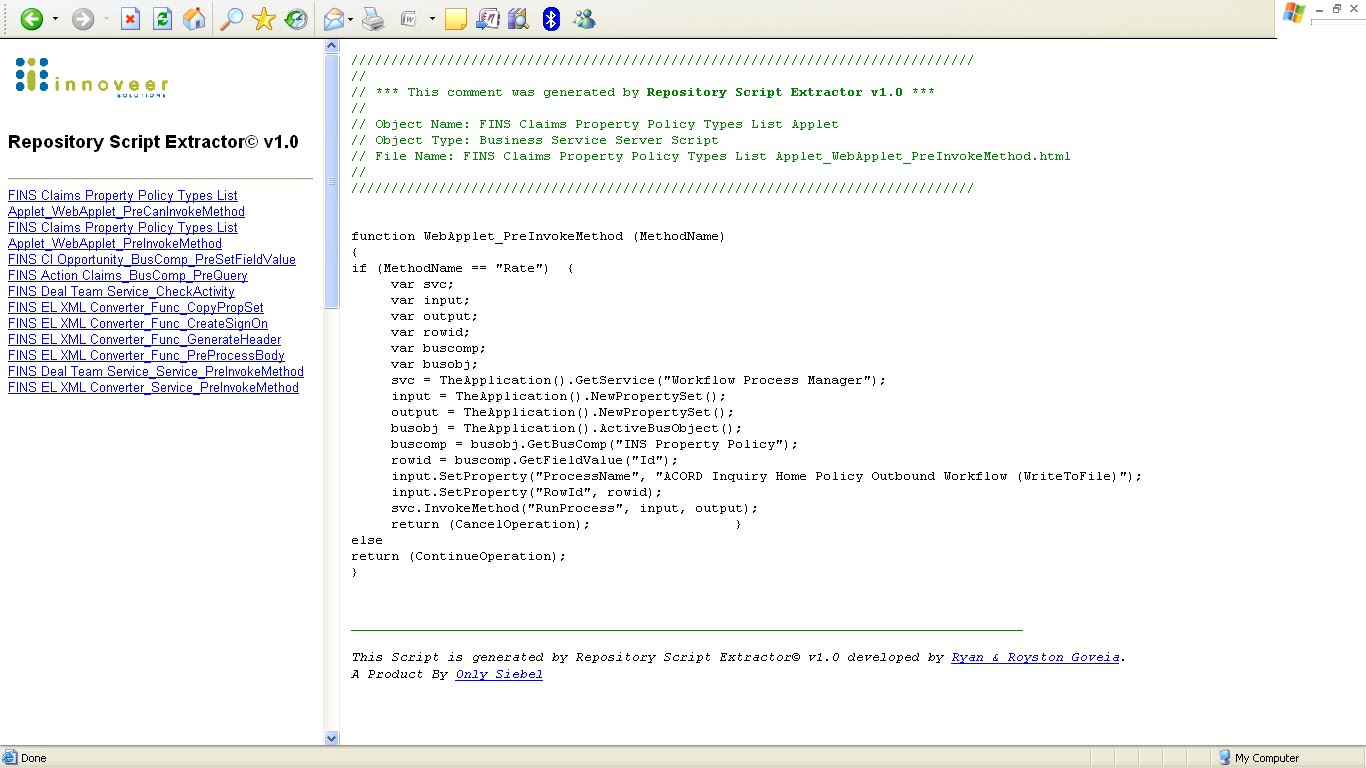
Here is a new tool the we have been working on. What it basically does is, it extracts the scripts based on a user given date or a prefix. Any scripts that were created or updated beyond the date will be exported into the excel sheet as well as in an HTML format just like the utility Oracle had introduced to extract scripts for versions 7.7 and earlier.

The tool connects to Siebel via the object layer and pulls out the information...

Here is a peak at what this tool looks like

Main UI


HTML Output


Click the below icon to download this cool tool..!


Cheers!

Sunday, April 11, 2010

Siebel CRM Market Statistics

Hey Folks,

A few graphs I'd like to share about Siebel CRM and its demand in the market.

                        Siebel World Wide Demand


                      Siebel – Favourite Cities


                        Siebel Salary Comparison


                       Siebel – Skills based demand trend


So for those of you who are not so sure on which area in siebel to pick up, this could give you a heads up...

Some More Graphs


Cheers!
Share/Bookmark